
Infinite Stair Lab
PilotTread: See How People Navigate Your Prototype While You Interview Them
Test HTML prototypes with Tread. Send live tasks to participants’ phones and compare taps, scroll depth, and task success across design versions.
- Exploration
- Prototype
- Pilot
- Available
AI tools make prototypes fast to build, but testing them still means screen recordings, heavy tools or notes from memory. Tread keeps the navigation data while you keep the conversation.
Imagine a shopper taps a filter that doesn’t respond, then keeps scrolling. If you’re listening and taking notes, it’s easy to miss the tap and the chance to ask what they expected to happen. We built Tread to capture those moments while you interview someone using your HTML prototype.
Participants open the prototype on their phone. You send tasks during the interview, and Tread records what they tap, how far they scroll, and which pages they visit. Afterward, you can review a session or compare how people worked through the same task in two design versions.
Why we built it
Tools like Claude make it easier to build an interactive HTML prototype. Running the test still leaves the moderator with two jobs at once. You’re listening for what the participant is trying to do while keeping track of what happens on the screen.
Recording an interview in Google Meet is straightforward. You can even record the participant’s screen if they share it. The work starts when you sit down with several recordings and try to answer the same questions for each one. Where did people tap? Did the tap do anything? How long did the same task take in the redesign?
Tools like Lookback and PlaybookUX are good at running and recording moderated usability tests. For a small team, subscriptions and session limits can make it expensive to test again every time the design changes.
We built Tread for agencies, small teams, and students. Bring an HTML prototype you built with Claude or ChatGPT, talk to participants in the meeting tool you already use, and let Tread log what happens on their phones. Afterward, you can compare how people completed the same task across versions. We designed Tread to run on a standard, low-cost PHP server, and we’re packaging the setup as a skill so an AI assistant can help you install it on your own server.
How a session works
- Upload the HTML prototype. Tread adds a script to record interactions on the testing subdomain. Each design version gets its own test link.
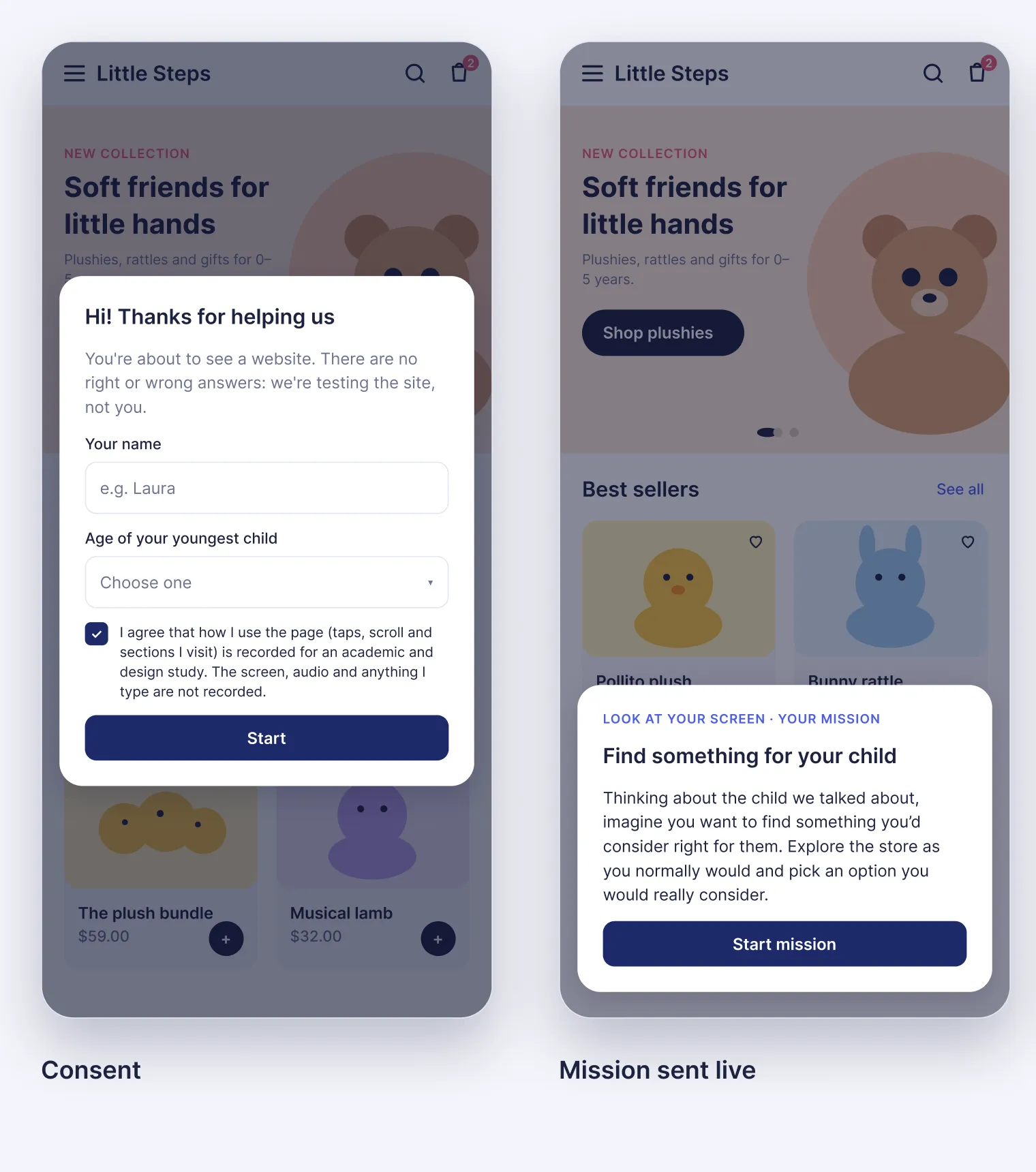
- The participant opens the link on their phone. A short entry form and an explicit consent screen come first. Recording starts only after they accept.
- The moderator sends missions live. Tasks appear on the participant’s screen within seconds, as a card and then as a small bar that stays visible while they navigate. Each mission gets a precise start and end.
- Review the session. The results panel shows the participant’s path, how they did on each task, and where they tapped or scrolled.
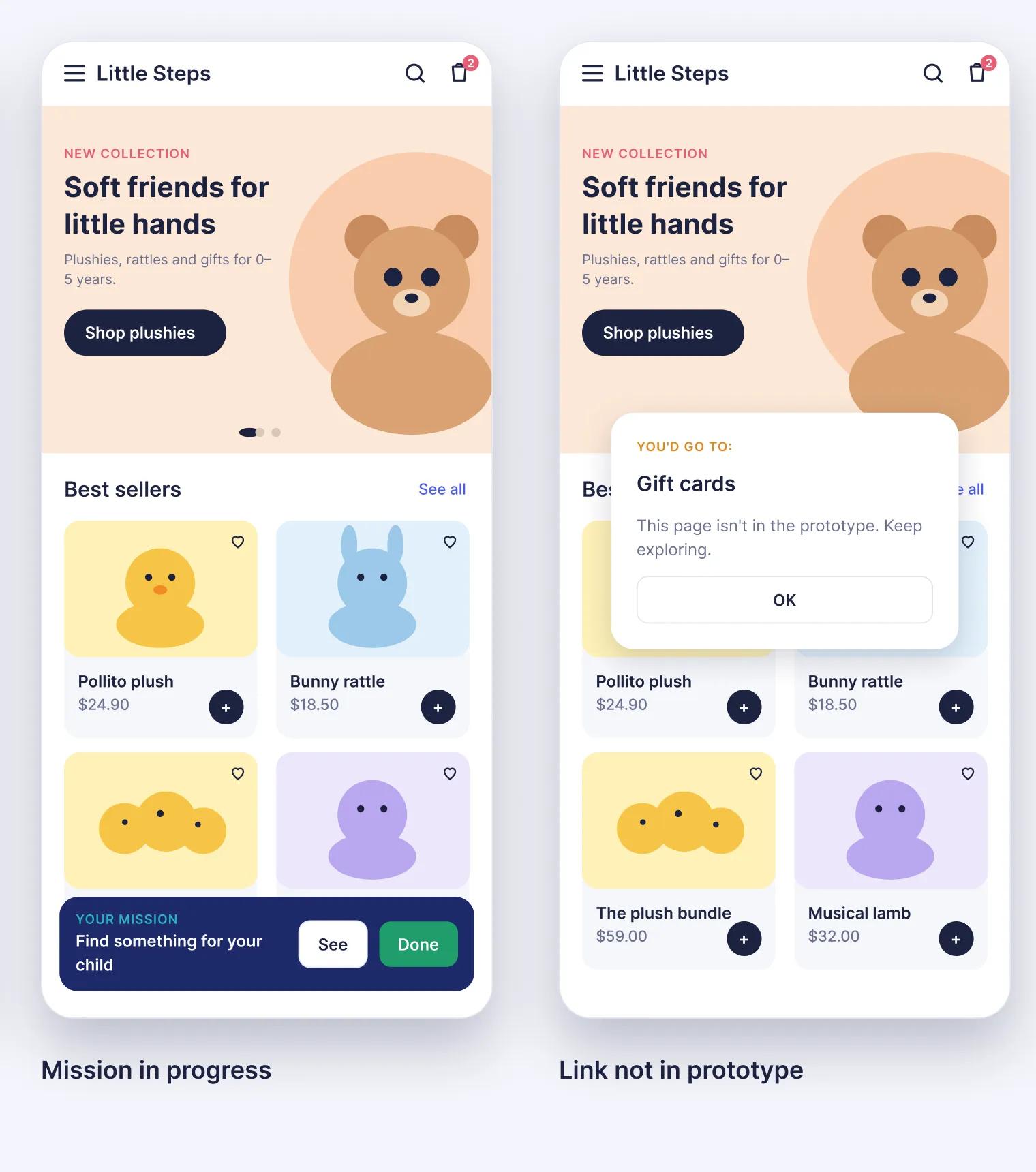
When someone taps a link to a page the prototype doesn’t include, Tread shows where the link would lead and logs the attempt. That gives you a specific follow-up to ask during the interview. What were they hoping to find on that page?
Compare how people complete the same task in two versions
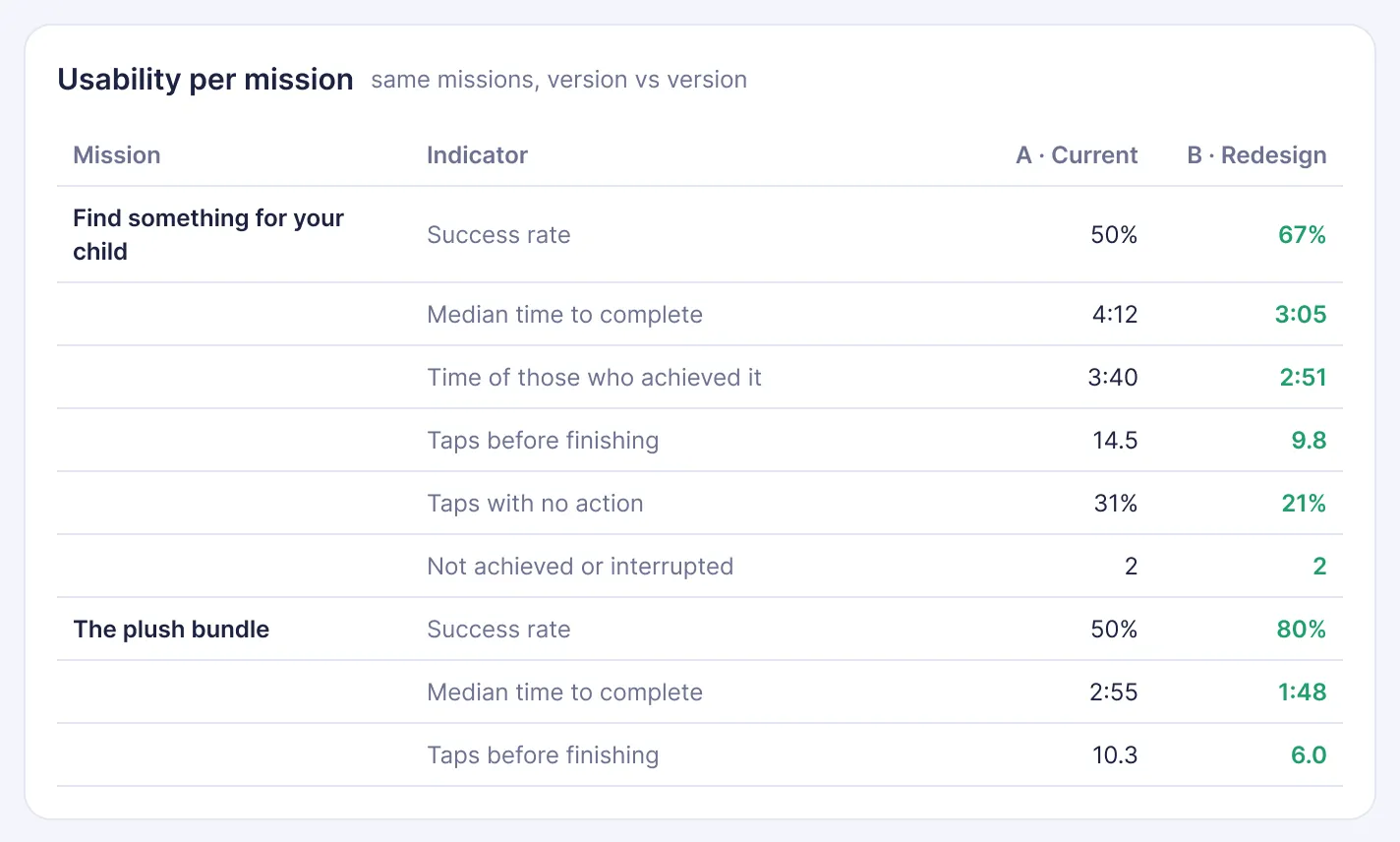
Send the same task from the shared library to people testing each design version and use the same criteria to judge success. For example, ask shoppers to find a product that meets a specific requirement. If fewer people succeed in one version, check the session timelines. Did they miss the filter, tap it without getting a response, or leave the listing without finding what they needed?
Tread shows task success, time to complete, taps, and the share of taps that had no effect side by side. Use that comparison to choose which sessions to review and which part of the design to investigate next.
A control room for the moderator
The Live view lists everyone with the test open, the page they are on and the last thing they touched, refreshed every few seconds. From there the moderator chooses what each person does next: a mission from the library, free navigation, or the closing interview. Not everyone has to receive the same missions or in the same order.
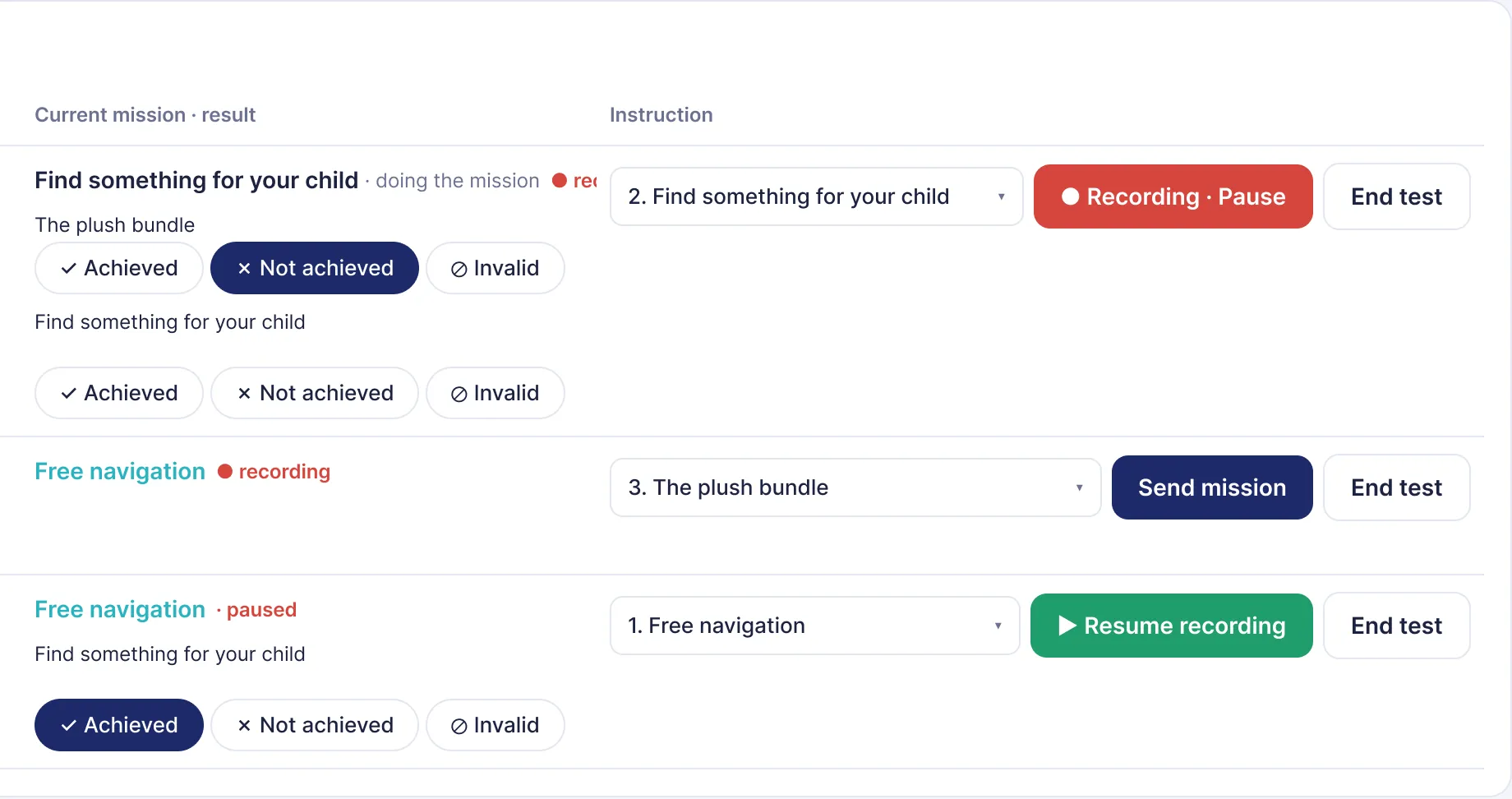
The moderator rates each task as achieved, not achieved, or invalid. If an interruption makes the result unusable, marking the task as invalid excludes it from totals and maps. The moderator can also pause and resume recording when the conversation moves off task.
Evidence you can point to
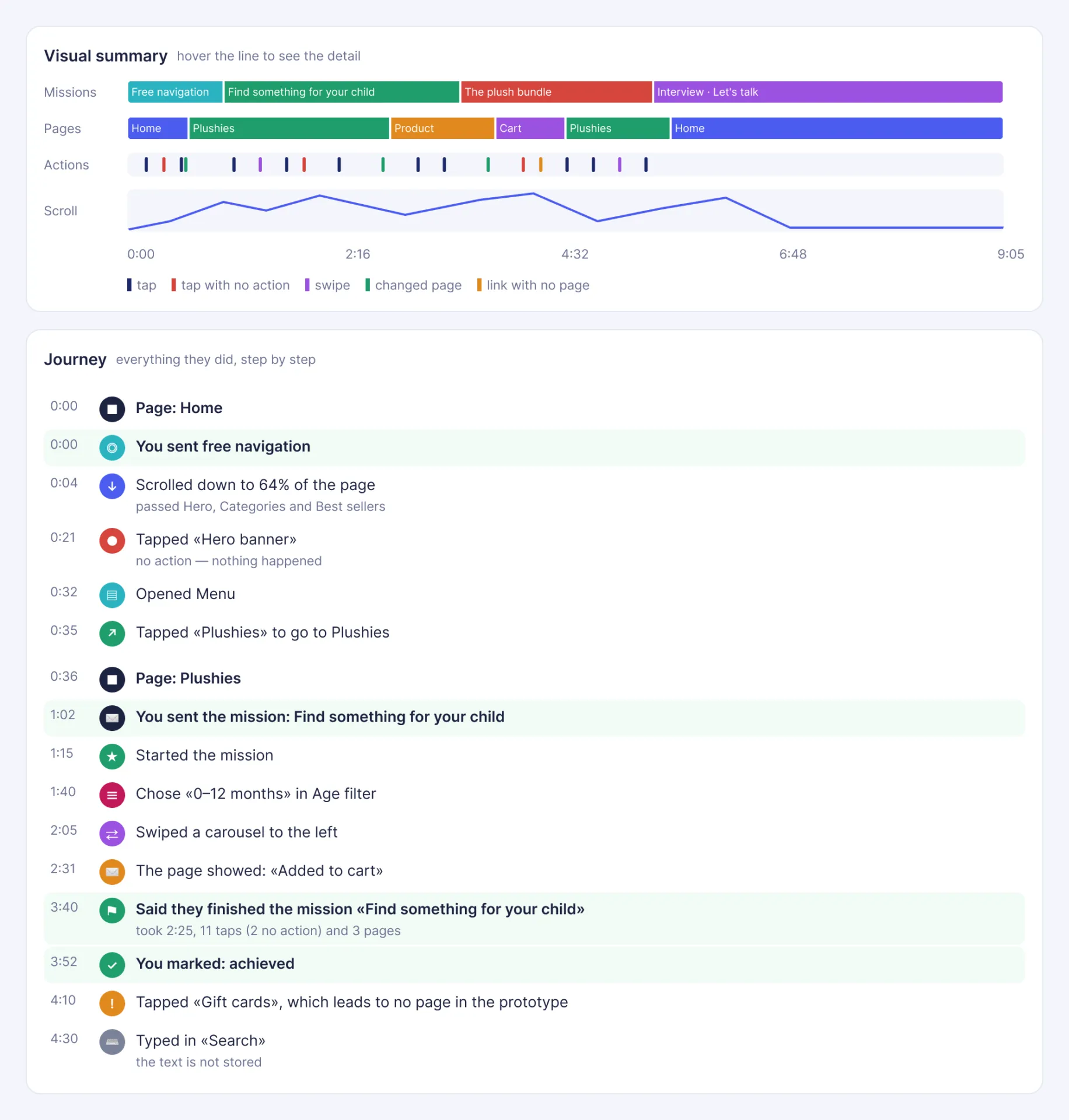
The session timeline brings tasks, page changes, taps, and scroll depth into one view. Open the event record to see details such as a filter selection, a menu opening, or an “Added to cart” message.
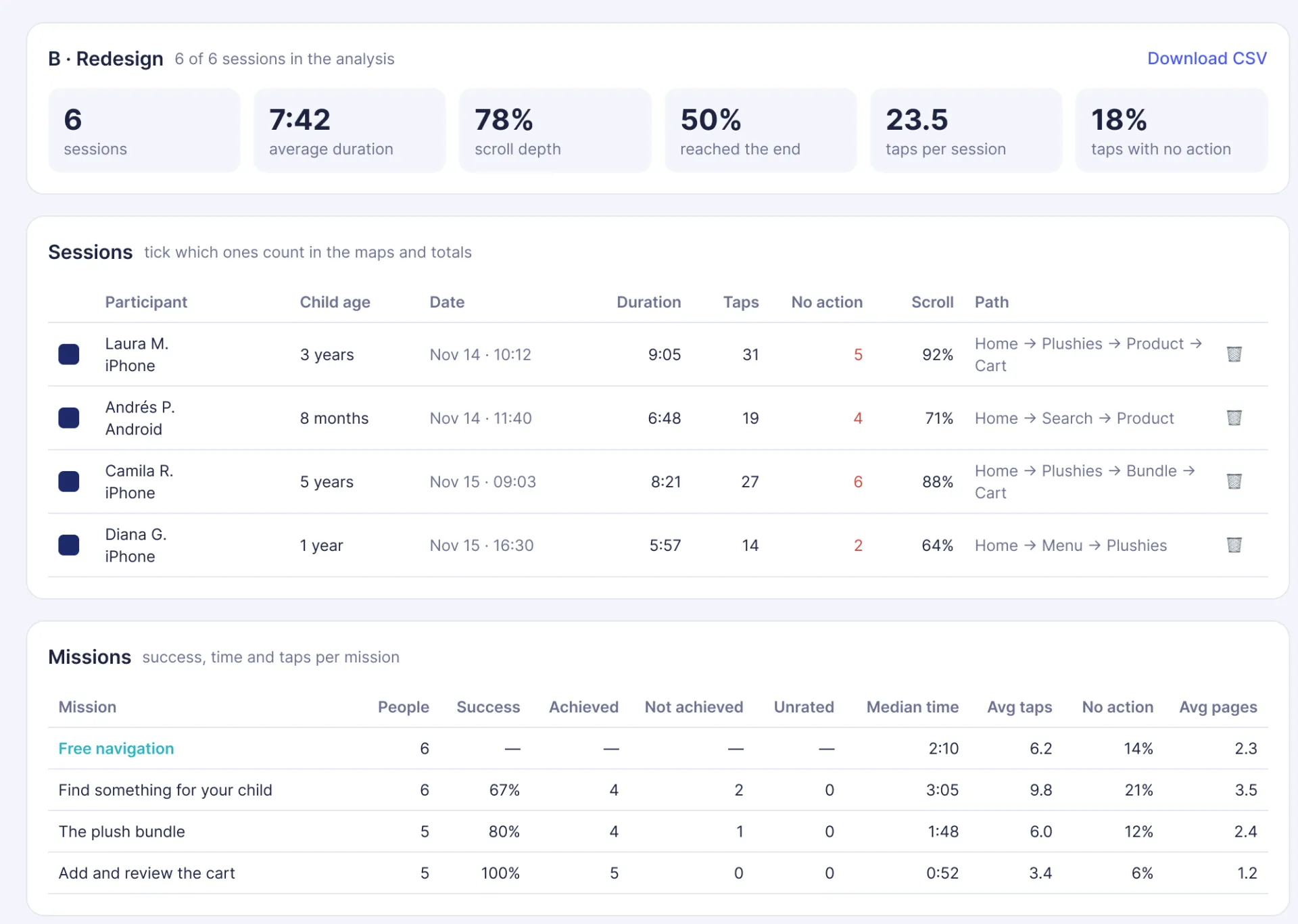
The results panel summarizes how participants used each version of the prototype.
- Headline metrics: duration, scroll depth, how many reached the end, taps per session and the share of taps that did nothing.
- Mission metrics: success rate, median time to complete, taps and pages per mission.
- What people tapped and how they moved between pages, with dead taps and missing pages flagged.
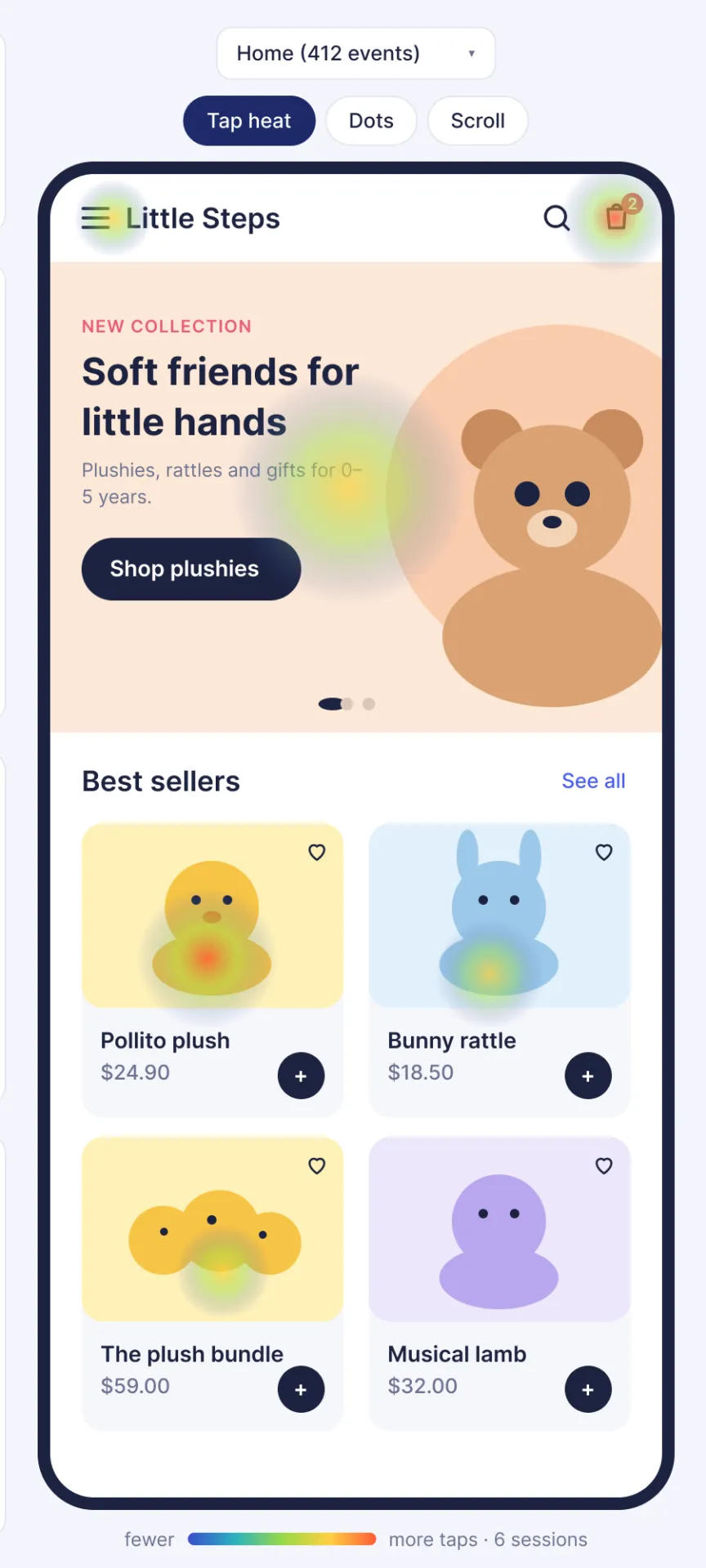
- Maps on the real prototype: tap heatmaps, individual taps and scroll maps, page by page.
- CSV export of every event for deeper analysis.
What Tread records
The participant completes a short entry form before giving consent to record their interactions. During prototype navigation, Tread logs that someone interacted with a field without saving the text they typed into it. Tread records interaction events and leaves the screen, camera, and audio unrecorded.
Tread is self-hosted. Session records are stored on the server running Tread, and the results panel is password-protected.
Remote or in person
In person, the participant uses their own phone next to the moderator. Remotely, the conversation happens on the video call tool you already use, and Tread runs in parallel on the participant’s phone. In both cases you keep the navigation data while you interview: the journey builds itself, so your attention stays on the person.
What it works with today
Tread currently supports prototypes delivered as HTML, such as interactive Claude artifacts exported as HTML or prototypes built with HTML, CSS, and JavaScript. The test setup runs on a PHP server.
We’re using Tread in a study that compares two versions of an ecommerce experience. We’re also packaging the setup as a shareable skill so other teams can run it with their own AI assistant.
What we’re learning
- Hypothesis
Seeing how someone navigated, step by step, lets the moderator ask sharper follow-up questions during the interview.
- Hypothesis
Recording interaction events instead of screen video makes participants more comfortable and recruitment easier.
- Learned
Tasks given only by voice are hard to time. Sending each mission to the participant's screen gives it a clear start and end.
- Learned
A narrated journey (scroll, taps, menus, page messages) is far easier to review after the session than a list of raw events.
- Learned
Moderators need to pause recording and mark a mission as invalid when a session is interrupted, so off-task moments don't distort the numbers.
- Testing
Mission success and time-on-task between two versions of an e-commerce prototype, in an ongoing study.
Participate
I’m interested
Register interest to receive updates as the project develops. Registering is not a commitment from either side.
This form goes to the project team and is separate from agency inquiries. Schedule a meeting