
Article · eCommerce Strategies
Agentic Commerce in 2027. How to Get Your Products Recommended by ChatGPT, Claude, Gemini, and Other AI Assistants
See how AI assistants choose products and what to update in your ecommerce product pages, structured data, and catalog feeds for 2027.

- Published
- Length
- 8 min read
Your next customer might decide what to buy before they ever visit your store. They ask an AI assistant what to buy, get a shortlist, and click straight through to the product that fits. Even a regular Google search can start with an AI-generated answer. In a Pew Research Center study of U.S. adults, people clicked a traditional search result on 8% of visits when Google showed an AI summary, compared with 15% when it didn’t.
To get your products into that conversation, make it easy for an assistant to find who each product is for, what it does well, and whether the right option is available to buy. That information lives in your product pages, the catalogs you share with each channel, and the other sources an assistant can consult.
Of all the ways you can use AI in ecommerce, two are worth distinguishing here. One is putting an assistant on your own site to answer questions about products, returns, and orders. The other is getting your products recommended by the assistants your customers already use. Let’s look at how to do the second.
Why would an AI assistant recommend your product?
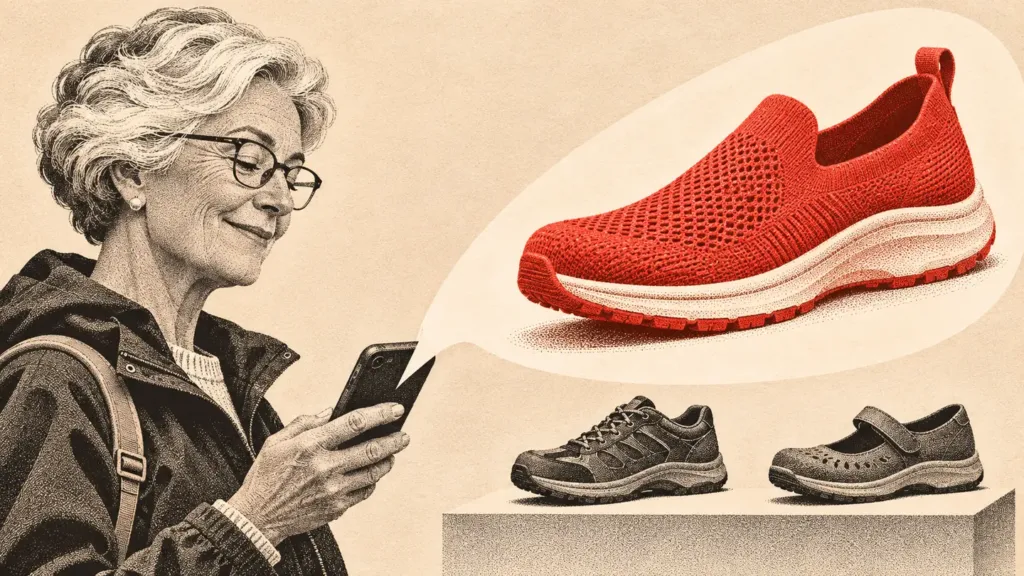
Mary is 65. She uses ChatGPT regularly and has memory turned on. It already knows her age, that she likes to get her walk in before the Florida heat kicks in, and that she prefers shoes she can slip on without bending down to tie them. One morning, she types four words.
“Comfortable shoes for me.”
ChatGPT can use what it already knows about Mary to interpret that request as a search for walking shoes. One model it might suggest is the Skechers GO WALK Flex Relish. Mary didn’t know the name of the shoe. She didn’t even ask for walking shoes. So why would this pair make the shortlist? Skechers describes it as a walking shoe with lightweight cushioning and a hands-free design. Those details fit the way Mary plans to use it. If you sell a shoe that fits her just as well, can the assistant find enough information to recommend yours?
ChatGPT is the AI assistant Mary talks to. The large language model, or LLM, helps interpret her request and write the response. When the assistant searches for current information, it can draw on sources such as product pages, retail catalogs, and reviews. The sources vary by platform. Claude can search the web and cite what it finds. Google can break a question into related searches and pull relevant pages from its index. When an assistant can also take actions on the buyer’s behalf, like selecting a size and building a cart, it’s acting as an AI agent.
Here’s how the three disciplines apply to Mary’s purchase.
| Discipline | What it means for your store |
|---|---|
| SEO · Search engine optimization | Help search engines discover and index the product page for your walking shoe. |
| AEO · Answer engine optimization | Give a clear answer to a question that could decide the purchase, such as “Can I put these on without using my hands?” |
| GEO · Generative engine optimization | Give an AI assistant enough reliable information to include your shoe when it recommends or compares options for a shopper like Mary. |
These practices overlap. Google treats optimization for its generative search features as part of SEO.
What should you change on your product pages?
“All-day comfort” tells Mary very little. A description that says the shoe is designed for daily walks, has lightweight cushioning, and slips on without laces gives her something to work with. Check your customer service chats, sales questions, and reviews to find the details that matter in your category.
- Product description. Explain what the model is designed for and what sets it apart. For shoes, that might include the activity, fit, available widths, and how the shoe goes on.
- Frequently asked questions. Answer the questions customers ask before buying. Can I put these on hands-free? Does this model come in wide? Can I return them after trying them on?
- Structured data in JSON-LD. JSON-LD is a format that labels information in the page’s code so systems like Google can recognize what each field means. For example, Schema.org’s
Productidentifies the item,ProductGroupcan describe how variants are related, andOffercan specify the price, currency, and availability. Those details should match what customers see on the page.
Check what retailers and reviewers say about your products, too. If your site lists regular and wide versions separately but a retailer groups them under one listing, the assistant may have trouble identifying the version Mary needs. Original measurements, photos, and side-by-side product tests give both shoppers and assistants more specific information to work with.
Where should you share your catalog?
A product feed sends a channel information such as the model, size, price, availability, and product page URL. What it does for discovery depends on where that channel uses the data.
| Channel | How it uses your catalog |
|---|---|
| Google Merchant Center | Supplies product data to Google’s shopping experiences, including AI-generated responses where applicable. |
| ChatGPT Business Hub | Eligible stores can claim and verify their profile, connect an existing Shopify catalog, or submit a compatible feed. Check which products were processed and whether any variants are missing or outdated. The feed gives ChatGPT a direct source of product data. A recommendation still depends on what the shopper asks and how ChatGPT selects products. |
| Meta | Catalogs support shoppable ads and, depending on the integration and market, agentic shopping experiences such as Muse where available. |
| TikTok | TikTok Shop uses product listings for search and recommendations inside TikTok. TikTok Ads uses its product catalog to show items in ads. |
How Infinite Stair helps you get there
We start with a category where better recommendations could make a difference to your business. Then we find out what shoppers ask, what the assistants see today, and what we need to fix in your store and across your catalog.
- Choose the purchases you want to show up for. We agree on the markets, languages, product categories, and assistants to focus on. We consider sales potential, margin, and stock availability. Then we define what success looks like for that category. It might mean getting a specific model recommended, getting your store listed as a place to buy it, or improving the accuracy of answers about fit, compatibility, or returns.
- Find out what drives the purchase. We look at Google Search Console queries, on-site searches, sales and support conversations, reviews, and return reasons. For Mary, “comfortable shoes” is where the search starts. Hands-free entry, cushioning, and width are what help her make a choice. We map those questions to the pages that should answer them.
- Establish your baseline for AI visibility. We test unbranded discovery queries, product comparisons, and questions about specific models. We record which brands show up, which products get recommended, which sellers are linked, and which sources are cited. We document the market, language, and search mode so we can rerun the tests. That gives us a way to tell whether you have a visibility problem, an accuracy problem, or both.
- Audit crawling and indexing. We check
robots.txt,noindexdirectives, sitemaps, internal links, canonical URLs, and redirects. We verify that key product information is accessible when the site relies on JavaScript and that variant URLs open with the right size or color selected. Each issue gets a priority and a clear way to verify the fix. - Fix product data at the source. We trace the data from Shopify, WooCommerce, your ERP, or your product information management system to the visible page, the JSON-LD, and each channel’s feed. We check SKUs, GTINs where assigned, category attributes, variants, prices, currencies, and inventory. If a size sells out and the feed still shows it in stock, we find where the update stops and fix it there.
- Improve product pages, answers, and structured data. We update the descriptions, FAQs, category pages, and comparisons that help shoppers choose. We add measurements, photos, or product tests when a claim needs evidence. We also validate the relevant Schema.org markup and review the outside sources assistants already cite for your category.
- Connect and validate your product feeds. We configure or fix the integrations that fit your store, including Merchant Center, Shopify Catalog, and ChatGPT Business Hub where eligible. After processing, we spot-check actual products to confirm the channel received the right variant, price, inventory, and link for that market. We also document who maintains the feed and how your team can spot a failed update.
- Run a pilot and measure what changes. We roll out improvements in a priority category and rerun the baseline queries. When possible, we compare the results with similar products we haven’t updated yet. We report what we fixed, whether your products show up more often or more accurately in our tests, and what visits, conversions, or sales we can identify. We use those results to decide what to roll out across the rest of your catalog.
References
Anthropic. (n.d.). Enable and use web search. Claude Help Center. https://support.claude.com/en/articles/10684626-enable-and-use-web-search
Chapekis, A., & Lieb, A. (2025, July 22). Google users are less likely to click on links when an AI summary appears in the results. Pew Research Center. https://www.pewresearch.org/short-reads/2025/07/21/google-users-are-less-likely-to-click-on-links-when-an-ai-summary-appears-in-the-results/
Google. (n.d.-a). Google’s guide to optimizing for generative AI features on Google Search. Google Search Central. https://developers.google.com/search/docs/fundamentals/ai-optimization-guide
Google. (n.d.-b). How to add merchant listing structured data. Google Search Central. https://developers.google.com/search/docs/appearance/structured-data/merchant-listing
Google. (n.d.-c). Intro to product structured data on Google. Google Search Central. https://developers.google.com/search/docs/appearance/structured-data/product
Google. (n.d.-d). Product variant structured data. Google Search Central. https://developers.google.com/search/docs/appearance/structured-data/product-variants
OpenAI. (n.d.-a). Memory in ChatGPT. OpenAI Help Center. https://help.openai.com/en/articles/8590148-memory-in-chatgpt
OpenAI. (n.d.-b). Setting up your business on ChatGPT. OpenAI Help Center. https://help.openai.com/en/articles/20001635-setting-up-your-business-on-chatgpt
OpenAI. (n.d.-c). Shopping with ChatGPT Search. OpenAI Help Center. https://help.openai.com/en/articles/11128490-shopping-with-chatgpt-search
OpenAI. (n.d.-d). Submit product feeds. OpenAI Developers. https://developers.openai.com/commerce/guides/submit-product-feeds
Shopify. (n.d.-a). Authenticate your agent. Shopify Developer Documentation. https://shopify.dev/docs/agents/get-started/authentication
Shopify. (n.d.-b). Selling on Meta. Shopify Help Center. https://help.shopify.com/en/manual/online-sales-channels/agentic-storefronts/meta
Skechers. (n.d.). Skechers Slip-ins: GO WALK Flex – Relish. https://www.skechers.com/skechers-slip-ins-go-walk-flex—relish/124963W_WPK.html
TikTok. (2025, December). About catalog roles and permissions. TikTok Business Help Center. https://ads.tiktok.com/resources/help/article/about-catalog-roles-and-permissions?lang=en
TikTok. (2026, May 14). The seller guide to Shop Tab success. TikTok Shop Academy. https://seller-us.tiktok.com/university/essay?knowledge_id=8750609034250026
Get Your Ecommerce Store Ready for AI Recommendations
Tell us what you sell and where your catalog lives. We’ll help you identify which product pages, structured data, and feeds to fix first so AI assistants can find and understand your products.

About the author
César Paternina
César Paternina is the founder of Infinite Stair and an ecommerce growth strategist with nearly two decades of experience across UX, digital commerce, omnichannel retail, and growth. He helps businesses understand what is limiting sales, improve customer journeys, and turn research and experimentation into better decisions and repeatable capabilities.
More from César Paternina